
Date Calculator7.3.0 - Download
You'll be able to download in few seconds.
Publisher Description
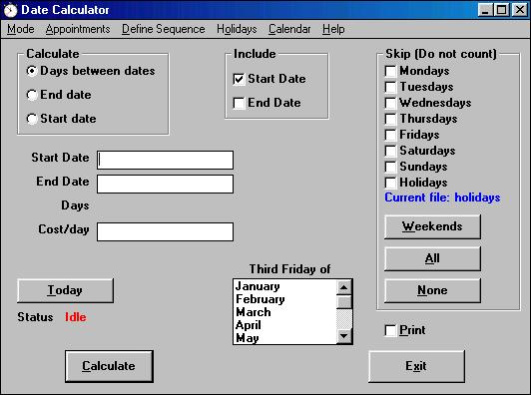
Date Calculator performs a variety of calendar related functions useful in business. It will display a calendar for any month of any year. It will calculate the number of days between any two dates, optionally not counting certain days of the week, such as Saturday and Sunday. It can also be programmed to skip holidays. It can also calculate the date X days before or after a given date, again optionally only counting certain user selected days of the week. It can automatically remind you of your appointments for the day, or show you a list of all your stored appointments, or only those appointments on any date you select. It has a feature for creating user definedsequences that will aid in the calculation of Gann, Lucas and Fibonacci turn dates. It has a separate mode that allows you to calculate time in terms of calendar years, months and days, as well as the standard mode of calculating exact days. This program is very popular with law firms and financial institutions. It has many uses, including (but not limited to):
1) Calculating remaining time before options expire in options trading
2) Loan and mortgage calculations
3) Appointment scheduling
4) Genealogy
5) Astronomical calculations
6) Business expense calculations
About Date Calculator
This Calculators & Converters program is available in English. It was last updated on 29 September, 2026. Date Calculator is compatible with the following operating systems: Windows.
The company that develops Date Calculator is Leithauser Research. The latest version released by its developer is 7.3.0.
The download we have available for Date Calculator has a file size of N/A. Just click the green Download button above to start the downloading process. The program is listed on our website since 2008-02-02 and was downloaded 0 times. We have already checked if the download link is safe, however for your own protection we recommend that you scan the downloaded software with your antivirus. Your antivirus may detect the Date Calculator as malware if the download link is broken.
How to install Date Calculator on your Windows device:
- Click on the Download button on our website. This will start the download from the website of the developer.
- Once the Date Calculator is downloaded click on it to start the setup process (assuming you are on a desktop computer).
- When the installation is finished you should be able to see and run the program.
Program Details
System requirements
Download information
Pricing
Version History
version 7.3.0
posted on 2008-02-02
Appointment reminder,year-month-day mode
Disclaimer
External Download
We do not host Date Calculator on our servers. We did not scan it for viruses, adware, spyware or other type of malware. This app is hosted by the software publisher and passed their terms and conditions to be listed there. We recommend caution when installing it.
The external download link for Date Calculator is provided to you by apps112.com without any warranties, representations or guarantees of any kind, so access it at your own risk.
If you have questions regarding this particular app contact the publisher directly. For questions about the functionalities of apps112.com contact us.
